
Two logos don't host an event
Co-hosting breaks at the logo bar. Keep the invite from one real sender, put both hosts on the page as people, and run the swap test before it ships.
Key Takeaways
- Two-logos on the invite from a made-up inbox reads as a marketing blast and is more likely to land in promotions or spam
- Co-hosting is two senders, not just two logos. Each host connects their own inbox and writes to the people they actually know
- Co-branding earns its place on the registration page, not the invite. Put both hosts on it as people
- Run the swap test: put your co-host's name where yours is. If the page stops feeling fair, it was built around one of you
Co-hosting can be the best thing you do all year.
Two networks in one room, a guest list neither of you could have filled alone, and a room full of people who now associate each other with you.
Teams rarely get the decision to co-host wrong. They get the execution wrong, and it breaks in the same spot every time. The moment co-hosting comes up, somebody reaches for the logos.
The logo reflex
You know the move. Both logos across the top of the invite, lined up, maybe an “x” in between…
A fresh shared inbox to send from. The sender renamed so it reads as two firms instead of your usual events address. It looks balanced so everyone nods.
The instinct makes sense. Two logos is the shorthand for “two organizations are involved,” and you want the credit shared fairly.
But, a logo names the second host without ever showing one.
And people don’t show up for logos. They show up for people.
What the reflex misses is that an invite and a registration page are two different moments, and they want opposite things.
An invite and a page want opposite things
The invite begs the question: should I open this, and is it from someone I trust?
The page asks a different one: is this room worth giving up an evening for, and who’s really behind it?
The click is about who’s asking. The yes is about what you’re walking into.
Once you see them as two separate jobs, where the co-branding belongs gets clear. Keep it off the invite. Put all of it on the page.
Strip the invite down and it has one job: land in the inbox, get opened, earn the click. Co-branding works against every part of that. Two logos and a renamed sender make the email read like a marketing blast, which means it’s more likely to land in promotions or spam, and less likely to be opened by the one guest you most wanted there.
Picture who you’re actually inviting. Someone with three email addresses and an assistant who screens two of them.
They can tell the difference between a tool that added them to a list and a person who chose them, and they can tell from the “from” line before they’ve read the date.
(If your invite keeps landing in promotions, a renamed sender and a logo bar are the first two things a spam filter is trained to demote. Send from a real person’s address and the problem usually goes away.)
So the line is this: two logos is co-branding, two senders is co-hosting.
Two logos don’t host anything. Two people, from two organizations, host an event together.
In Gatsby that’s literal. You connect your own inbox, you add your co-host to the event, and they send from their own address. You can’t send as them and they can’t send as you. Each guest gets a note from the person who actually knows them, and you can still pull up any guest’s profile and see every email that went to them.
A personal note also carries an obligation a blast never will. If someone you know chose you and asked directly, you don’t ghost them.
Make your co-host a host
The brand moment is real. It just belongs one click later, on the page, where the guest has already trusted the person and is now deciding whether this is worth a Thursday night.
A logo bar isn’t the enough of an answer here either.
Drop your co-host’s mark in the corner of a page that’s running your fonts, your colors, your name in the URL, and your domain on the confirmation email, and to everyone looking at it they read as a guest you were kind enough to credit.
That cost doesn’t land on the guest. It lands on your co-host. The whole reason to co-host is that they’re bringing their network into your room, putting their people on the same list as yours.
If the page makes them feel like a guest at their own event, you got the logo and lost the relationship.
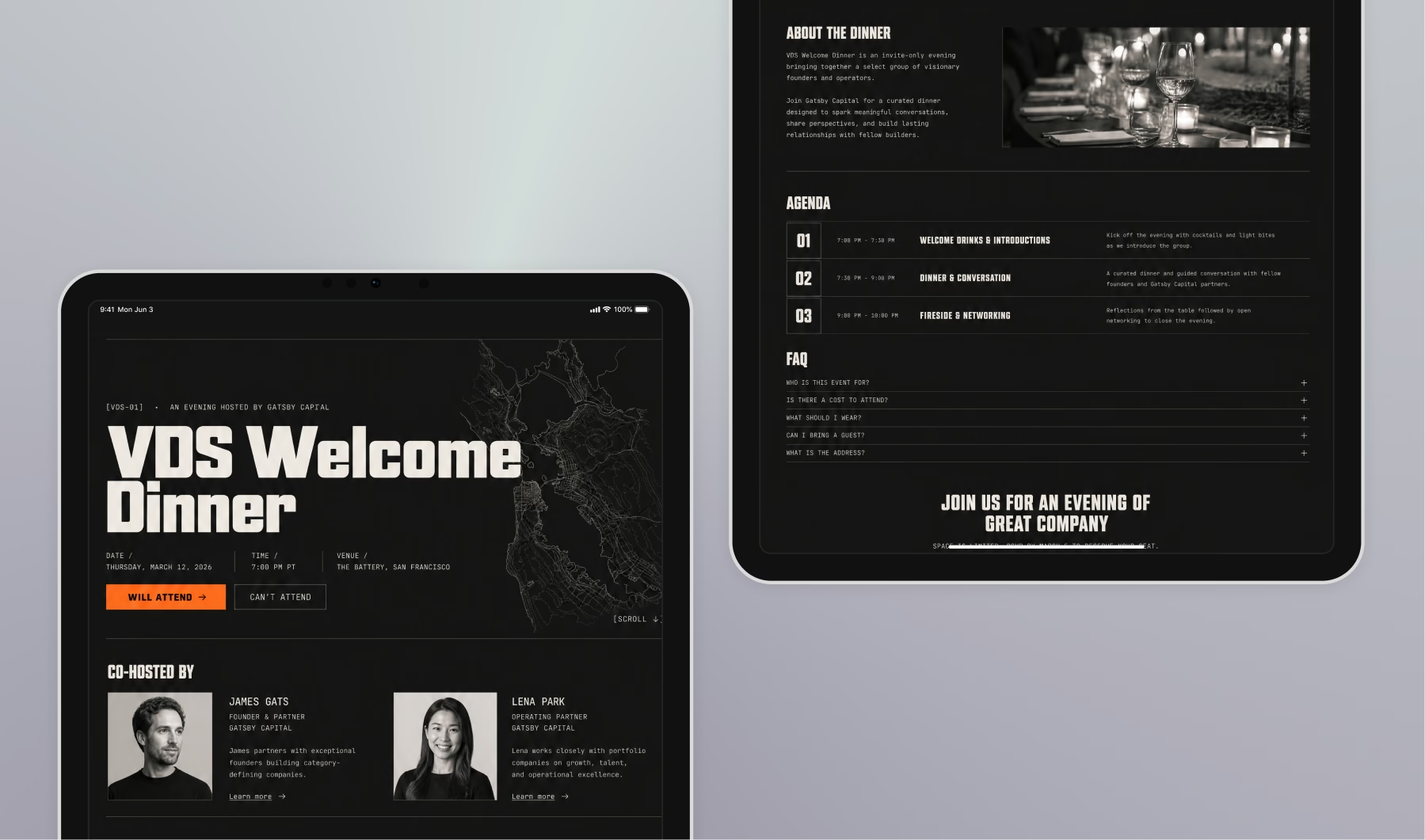
So put both hosts on the page as people.
A photo, a name, a title, and a line or two from each on why they’re hosting this and why now, in their actual voice.
You almost never see that second part on a registration page, and it lands, partly because it tells the guest who the room is for. A face does what a logo can’t. This holds whether your co-host is another firm, a portfolio company, an alumni chapter, or the channel partner whose customers you’re both trying to reach.
The swap test
Here’s how you know you pulled it off. Swap the names. Put your co-host where you are and yourself where they are, then look at the page.
Does it still feel fair?
Would you be happy to receive this version? If it feels off, the page was built around one of you, and the other got a logo to even it out. The swap test catches that every time.
Passing it sometimes means pulling the page away from your own brand.
That’s fine, and often right. Reach for a neutral template, find ground that feels a little like both of you, and let the page belong to the event instead of to one host.
For billing, go same size, same weight, neither name leading, alphabetical. It reads neutral, and it’s the easiest call you’ll make all week.
Less work than it sounds
The catch you’re bracing for is that all of this lands on you. It doesn’t have to.
You add your co-host as an external collaborator on the single event.
They get that one event and nothing else.
They can upload their own guests, send from their own inbox, and edit the page alongside you. Plenty of co-hosts won’t want to touch the page, and that’s fine. The point is they can, and they never touch your contacts or any of your other events.
One thing to try
Pick one co-hosted event you’ve got coming up. Build the page for both of you.
Add a face and a reason for each host, equal billing, alphabetical. Then run the swap test before it goes out.
If the version with the names swapped is one you’d be glad to receive, send it.
Frequently Asked Questions
Should you put both logos on a co-hosted event invitation?
Think of it like this... the invite's only job is to get opened and earn the click, and a two-logo email from a renamed sender reads as a marketing blast that lands in promotions or spam. Send it from one real person the guest already knows, and save the co-branding for the registration page.
How do you add a co-host to an event in Gatsby?
Add them as an external collaborator on that single event. They get that event and nothing else. They can upload their own guests, send from their own inbox, and edit the landing page alongside you, without ever touching your contacts or your other events.
What is the swap test for a co-hosted event page?
Swap the two hosts' names and placements, then look at the page. If it still feels fair and you'd be happy to receive it, the page belongs to the event. If it feels off, it was built around one host and the other got a logo to even it out.
The Shortlist Monthly
For teams whose guest list is a shortlist
Once a month we send the best of what we published, one email, from the team at Gatsby.